Showing posts with label Bangladesh Paypal Tutorial. Show all posts

জলদি নিয়ে নিন ২৫ ডলার বোনাস সহ মাস্টারকার্ড ও জেনে নিন বাংলাদেশ থেকে পেপাল অ্যাকাউন্ট খোলা ও টাকা তোলার সহজ…

একটি Verifyed পেপাল Account থাকা যে কত গুরুত্বপূর্ণ তা বলার অপেক্ষা রাখে না। আজকে এই লেখাটির মাধ্যমে বাংলাদেশ থেকে একটি পেপাল Account তৈরী, Verify করার নিয়ম এবং পেপাল এর ডলার কিভাবে মাস্টার কার্ড এর মাধ্যমে উত্তোলন করার সর্বউত্তম উপায় নিয়ে বিস্তারিত আলোচনা করব। আসুন ধাপে ধাপে বিষয় গুলো আলোচনা করা যাক।

এই পোস্টে যেই বিষয় গুলো আলোচনা করা হবেঃ

  • একটি USA Verifyed Paypal Account করার উপায়।
  • একটি ফ্রী Payoneer এর Mastercard পাওয়ার উপায়।
  • US Virtual ব্যাংক এর মাধ্যমে পেপাল verifyed করার উপায়।
  • পেপাল এ payoneer এর mastercard যোগ করার নিয়ম।
  • Paypal এর ডলার Payoneer এর Mastercard এ নিয়ে আসার উপায়।
  • Paypal এর অ্যাকাউন্ট Personal থেকে Premiere এ Upgrade করার উপায়। ।
  • পেপাল নিয়ে আরও কিছু দিক নির্দেশনা।

প্রয়োজনীয় উপকরন এবং খরচঃ

  • USA এর ঠিকানা দিয়ে তৈরী করা একটি Paypal Account.
  • Verification এর জন্য Paypal অ্যাকাউন্ট এ ১-২ ডলার থাকতে হবে।
  • একটি Payoneer এর MasterCard।
  • Payoneer এর US Payment Service Active থাকা।

Paypal Account তৈরী করাঃ

প্রথমেই আপনাকে একটি Paypal Account তৈরী করতে হবে। Account  তৈরীর সময় নিচের বিষয় গুলো অবশ্যই খেয়াল রাখবেন।
  • Account টি অবশ্যই USA এর ঠিকানা দিয়ে করতে হবে .
  • আপনার যদি National ID Card থাকে তাহলে ID Card এর অনুযায়ী নাম ব্যাবহার করবেন।
Paypal Account এ Sign Up করার নিয়মঃ
১। প্রথমেই Paypal এ প্রবেশ করে Signup  ক্লিক করুন.
২। এখন নিচের চিত্রের মত Select করুন এবং Get Started এ ক্লিক করুন।

৩। এখন Get Started এ ক্লিক করার পরে নিচের Page আসবে। নিচের চিত্রের মত ফরম টা পূরণ করুন । ( USA এর Address এবং ফোন নাম্বার এর জন্য http://www.fakenamegenerator.com ব্যাবহার করতে পারেন।

৪। সবকিছু ঠিক থাকলে Agree and Create Account ক্লিক করলে আরেক টি পেজ আসবে এবং একটি Captcha Code চাইবে Captcha Code টাইপ করে Submit করুন। ব্যাস হয়ে গেল আপনার Paypal Account এর রেজিস্ট্রেশান। এখন Email Check করে Email Verification করে নিন।

ফ্রী Payoneer  Mastercard এর জন্য আবেদন করাঃ

Payoneer হল একটি WorldWide ফ্রী মাস্টারকার্ড প্রদান কারি প্রতিষ্ঠান। Payoneer এর Prepaid ডেবিট MasteCard এর মাধ্যমে আপনি বিভিন্ন কোম্পানি থেকে Payment Receive করতে পারবেন। যেমনঃ Odesk, Infolinks ETC. আজকে Payoneer নিয়ে বেশি আলোচনা করবনা। আজকে দেখাব কিভাবে Payoneer এর মাধ্যমে Paypal Account Verify করা যায়। এবং Payoneer এর US Payment Service ব্যাবহার করে কিভাবে Paypal এর ডলার Payoneer এর মাস্টার কার্ড এ আনা যায়।
Payoneer এর মাধ্যমে আপনি যেসব সুবিধা পাবেনঃ
  • একটি  Worldwide গ্রহণযোগ্য ফ্রী মাস্টারকার্ড পাবেন।
  • আমেরিকার একটি Virtual ব্যাংক Account পাবেন।
  • US Payment Service এর মাধ্যমে Paypal, Moneybookers, Google Addsence সহ বিভিন্ন কোম্পানি থেকে Payment গ্রহন করতে পারবেন।
  • Payoneer এর Virtual US Bank Account দিয়ে Paypal Account Verify করতে পারবেন।
  • Payoneer এর Master Card দিয়ে পৃথিবীর যেকোনো দেশের MASTERCARD Supported ATM Booth থেকে Dollar উত্তোলন করতে পারবেন।
আপনার যদি আগেই Payoneer এর MASTERCARD থাকে তাহলে নতুন করে আবেদন করার দরকার নাই। সাধারনত বিভিন্ন Company  এবং Payoneer এর Affliate Referal লিঙ্ক থেকে Payoneer এর কার্ড এর জন্য আবেদন করা যায়। যেমনঃ Infolinks, Odesk, Freelancer, ইত্যাদি। যাদের অইসব কোম্পানি তে Account নাই তাদেরকে আমার Affiliate Link দিচ্ছিঃ
১। প্রথমেই নিচের লিঙ্কে প্রবেশ করে Signup করে নিনঃ
PAYONEER SIGNUP LINK
(এইখান থেকে Signup করলে আপনি পাবেন ২৫ ডলার ফ্রী সাথে আমি নিজেও পাব ২৫ ডলার)
NB: আপনি প্রথম ১০০ ডলার লোড করার পরে ২৫ ডলার ফ্রী পাবেন। তাই কেউ শুধু ২৫  ডলার বোনাস এর আশায় হুদাই Payoneer Account খুলবেন না। আমি রেফারেল লিঙ্ক দেওার কারন হল । Payoneer এর Activation চার্জ হল ৩০ ডলার এর মত। তাই আপনি যদি Payoneer এর কার্ড ব্যাবহার করেন তাহলে এই ২৫ ডলার দিয়ে অন্তত Payoneer এর Activation চার্জ টা দিতে পারবেন। )
২। উপরের লিঙ্কে ক্লিক করার পরে SIGN UP এ ক্লিক করুন।  তখন  নিচের মত একটি পেজ পাবেন-

৩। এখন এইখানে ৩ টি ধাপ আপনাকে পুরুন করতে হবে।
  • Cardholder details
  • Card Account Information
  • Registration Verification
৪। এখন Cardholder Details এর বাম পাশে ক্লিক করে সঠিক ভাবে আপনার National ID Card/ Passport অনুযায়ী পূরণ করুন। নিচে একটি Sample দেওয়া হলঃ
First Name On Your ID:   MD MONZORUL
Last Name on Your ID:     HAQUE
Date of Birth:                      January/20/1964
Email Address:                   example@gmail.com (আপনার Email Address)
Retype Email Address:     example@gmail.com (পুনরায় আপনার Email Address)
Country:                              Bangladesh
Home Address:                  Vill-Sonarua, Word-3, Torgaon (আপনার বাসার ঠিকানা) -১ম লাইন
Kapasia, Gazipur-1730 (আপনার বাসার  ঠিকানা) -২য় লাইন
City:                                       Gazipur
Zip/Postal Code:                 1730 (পোস্টাল  কোড)
Phone Number:                 +8801700000000 ( আপনার ফোন নাম্বার) – এইখানে আপনার মোবাইল নাম্বার ও দিতে পারেন ।
Mobile Number:                +8801900000000 ( আপনার মোবাইল  নাম্বার)

৫। আপনার কার্ড যদি অন্য কোন ঠিকানায় আনতে চান তাহলে উপরের চিত্রের নিচের দিকে  দেওয়া Check Box এ টিক দিয়ে নতুন ঠিকানা দিনঃ

৬। এখন Card Account Information এর বাম পাশে  ক্লিক করুন এবং নিচের চিত্র অনুযায়ী তথ্য দিনঃ

৭। এখন Registration Verification এর বাম পাশে  ক্লিক করুন এবং নিচের চিত্র অনুযায়ী তথ্য দিনঃ
  • National ID Card
  • Passport
  • Driver Lisence
উপরের ৩ টির মদ্ধে যেকোনো  একটি সিলেক্ট করে ID Number দিনঃ

৮। এখন সব ঠিক ভাবে পূরণ করে Finish এ ক্লিক করুন । আপনার Payoneer এর Registration সম্পন্ন হল।
ইমেইল চেক করুন যদি ফটো আইডি স্ক্যানিং করে পাঠাতে বলে তবে পাঠিয়ে দিন আর যদি Declined দেখায় তবে নিচে সমাধান দেখুন ।
Payoneer Application Declined সমস্যার সমাধান নিন ।
>>> বর্তমানে application করার সাথে সাথেই decline করে দেয়। ছবিটা এরকম


এখন এপ্লিকেশন ডিক্লাইন হবার পর আপনি এই সাইটে যাবেন http://www.payoneer.com/emailform.aspx
ফর্মটা এভাবে পূরণ করতে পারেন…

আপনার নাম, ই-মেইল সঠিক ভাবে পূরণ করবেন। Program/Partner এর ঘরে Others দিতে পারেন। যদি আপনি কোন Program এর সাথে থাকেন সেক্ষেত্রে নাম উল্লেখ করতে পারেন। Choose a category for your question এর ঘরে Account Applications নির্বাচন করুন। Choose the subject of your question এর ঘরে My application was declined and I’m requesting to have it reconsidered. Your questions or comment এর ঘরে আপনার কথা লিখুন। এরপরে সাবমিট করুন।
এরপর আপনার ই-মেইলে একটা মেইল আসবে। মেইলটা দেখতে কিছুটা এরকম…


তবে এক্ষেত্রে আমার একটা সাজেশন আছে। সেটা হল approve হবার আগে আপনি ওদের কাস্টমার সার্ভিসে চ্যাট করলে বিষয়টা আরো দ্রুত হবে। চ্যাট করতে এই লিঙ্কে যাবেন http://www.payoneer.com/contactUs.aspx
এখন ওদের Live Help Offline এ আছে। সোমবার থেকে শুক্রবার ওদেরকে পাওয়া যায়। তবে চ্যাট করার সময় Security Ques এর answer প্রদান করতে হবে।
আশা করি Payoneer নিয়ে সকলের বর্তমান অসুবিধা কিছুটা হলেও সমাধান হবে।

Note:  Payoneer আপনাকে Mail করে National ID/ Passport or Driving Lisence এর Scan কপি আপলোড করতে বলবে ।
National ID/ Passport or Driving Lisence এর Scan কপি আপলোড করে পাঠিয়ে দিবেন ।
বেশ কিছুদিন রিভিউ জমা থাকার পর আপনাকে মেইল করে আবার আপনার ঠিকানা ইমেইলে চাইতে পারে , তখন আপনি যা করবেন আপনার ঠিকানা আবার ইমেইল করে পাঠিয়ে দিবেন তাদের দেওয়া সংখ্যার মধ্যে । এখানে খেয়াল রাখবেন C/o এই অপশন ব্যবহার করবেন না , আগে যদি আবেদন করার সময় ব্যবহার করে থাকেন তবে ঠিকানা দেওয়ার পাশাপাশি লিখে দিবেন এখানে শুধুমাত্র আমার ঠিকানা দিলাম , কার্ড পাঠানোর সময় আবেদন করার সময় C/o সহ যে ঠিকানা দিয়েছি সেটাতে যেন কার্ড পাঠানো হয় ।
তারপর কার্ড Approve হলে আপনাকে Shipping Date মেইল এর মাধ্যমে জানিয়ে দেওয়া হবে। সাধারনত কার্ড আসতে ২০ থেকে ৩০ দিন লাগে। DHL এর মাধ্যমে ৬০ ডলার খরচ করে ৩ দিনে আপনার কার্ড পেতে পারেন।


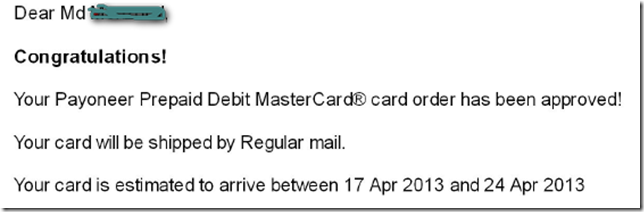
Payoneer এর Account Approve হয়ে যাবে ইনশাল্লাহ। Approve হলে নিচের মত একটা মেইল পাবেনঃ
Dear Md Monzorul,
Congratulations!
Your Payoneer Prepaid Debit MasterCard® card order has been approved!
Your card will be shipped by Regular mail.
Your card is estimated to arrive between 17 Apr 2013 and 24 Apr 2013
আপনি আরো যে যে কাজে কার্ডটি ব্যবহার করতে পারবেন???
  • অনলাইন শপিং।
  • অনলাইন বিল উত্তোলন ও প্রদান।
  • ওডেক্স, ফ্রিল্যান্সার সহ অন্যান্য জনপ্রিয় ফ্রিল্যান্সিং সাইটে টাকা উত্তোলন ও বিল প্রদানের জন্য ব্যবহার করতে পারবেন।
  • ফেসবুক, টুইটার, গুগুল প্লাস, গুগুল, ইয়াহু সহ অন্যন্য সকল সামাজিক যোগাযোগ সাইটে আপনার প্রতিষ্ঠানের বিজ্ঞাপন প্রচারের কাজে ব্যবহার করতে পারবেন।

Payoneer  এর  Virtual US Bank Account 

চিন্তা করছেন কার্ড এর জন্য আতদিন  অপেক্ষা করবেন । কার্ড Approve হওয়ার সাথে সাথে আপনি পাবেন Payoneer এর US Virtual Bank Account এর ( Routing Number এবং Account Number) . কার্ড আসার আগেই আপনি এই Virtual Bank Account ব্যাবহার করে আপনার Paypal Verify করতে পারবেন। এই USA এর Virtual Bank Account কে Payoneer এর US Payment Service বলা হয়। আপনার Payoneer এর কার্ড Approve হলে আপনার Payoneer অ্যাকাউন্ট এ Login করুন তাহলেই US Payment Service নামে একটা option দেখতে পাবেন ।
NOTE: US Payment Service Option টা আপনার Payoneer এর অ্যাকাউন্ট  Approve হওয়ার পরে দেখতে পারবেন।

এখন US Payment Service এ ক্লিক করার পর আপনার US Virtual Bank Account এর তথ্য পাবেনঃ

পেয়ে তো গেলেন আপনার USA এর Virtual Bank এর Routing and Account Number. এইটা  হল Checking Account. এই ব্যাংক  দিয়ে এখন আপনি অনায়াশেই আপনার  USA এর ঠিকানা দিয়ে করা Paypal Account টি Verify করে নিতে পারবেন।

Paypal Account ব্যাংক Verify করা

প্রথমেই আপনার Paypal Account এ MINIMUM 1-2 $ Load করে নেন । ( তবে পেপাল এ  ডলার Load না করলেও মনে হয় সমস্যা নাই )।  আপনার Paypal Account এ লগিন করুন । এবং Get Verifyed এ ক্লিক করে Link A Bank Account এ ক্লিক করুন । এবং নিচের চিত্রের মত Payoneer US Payment Service এ Virtual Bank Acocunt এর Routing and Account Number দিয়ে Submit করুন । 

এখন পেপাল আপনার Account থেকে ২ টা Small Amount আপনার Bank এ Diposit করবে। অই ২ টা Amount আপনি আপনার Payoneer এর Account এ লগিন করে দেখতে পারবেন। সাধারনত ২ দিন সময় নিতে পারে।  

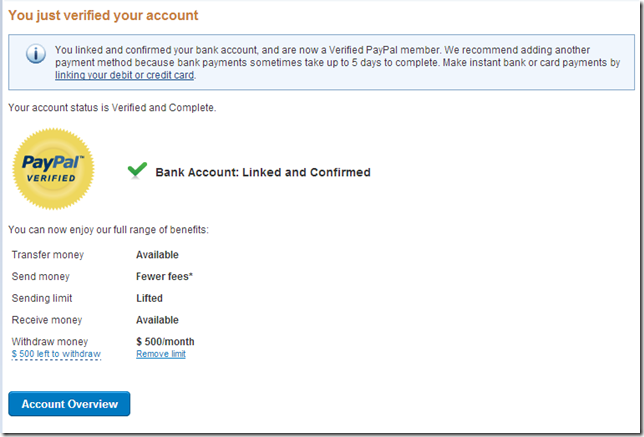
এখন Diposit হওয়া ২ টা amount আপনি আপনার Paypal এ লগিন করে Confirm Bank Account এ ক্লিক করে Submit করেন। তাহলেই আপনার Paypal Account টি verifyed হয়ে যাবে। 

ঠিকভাবে ২ টা amount প্রবেশ করলেই আপনার পেপাল অ্যাকাউন্ট ভেরিফাইড হয়ে যাবে ।
paypal in bangladesh

***Paypal এর মাধ্যমে বড় Amount লেনদেন এর ক্ষেত্রে অবশ্য করনীয়***

অনেকে অভিযোগ করেন যে বড় Amount এর Transaction করলে পেপাল অ্যাকাউন্ট লিমিট করে দেয়। আমরা যখন পেপাল অ্যাকাউন্ট খুলি, তা থাকে Personal Account. পেপাল এ পার্সোনাল অ্যাকাউন্ট এর কিছু Limitation থাকে। Personal Account সাধারনত ছোট Amount লেনদেন এর জন্য ব্যাবহার হয়ে থাকে। যেমনঃ পরিবার এর কাউকে কিছু টাকা দেওয়া, ছোট খাট বিল প্রদান ইত্যাদি। তাই Personal Account থেকে বড় Amount লেনদেন করলে পেপাল Account লিমিট করে দিতে পারে।
তবে খুব বেশী জরুরী না হলে আপগ্রেড না করাই আমি ভালো মনে করি , কারন আপগ্রেড করলে পরে ট্যাক্স সংক্রান্ত ডকুমেন্ট চাইতে পারে ।
আসুন জেনে নেই এর সমাধান।
পেপাল এর অ্যাকাউন্ট ৩ প্রকারঃ
  • Personal
  • Premiere
  • Buisness
তাই আপনি যদি বড় Amount এর ডলার আদান প্রদান এর প্রয়োজন হয় তাহলে আপনার পেপাল অ্যাকাউন্ট টি ফ্রীতে Premiere Account এ Upgrade করে নিবেন।
Paypal Premiere Account এর সুবিধাঃ
Premier accounts are for members who will have a high transaction volume, need to accept credit card payments, or would like access to our special features not offered with Personal accounts. Premier accounts include all the benefits of Personal accounts, as well as our special features
পেপাল Premiere Account এর Special Features:
Send Money
Send payments to anyone with an email address.
Request Money
Request payments from anyone with an email address.
Auction Tools
Accept PayPal directly from your auction listings.
Automatically invoice your buyers.
Automatically remind bidders about your auctions.
Accept payments on your website.
Create PayPal buttons and accept instant payments from your website.
International Payments
Send and receive payments with members in 190 countries and regions.
PayPal Debit MasterCard BusinessCard®
Get instant access to the money in your PayPal account.
Account Insurance
Your PayPal balance is FDIC insured up to $100,000.00 USD
Downloadable Log
Download your account history into a spreadsheet or Quicken.
Email-based customer service

আসুন দেখে নেই পেপাল এর Upgrade প্রক্রিয়াটিঃ

**প্রথমে পেপাল এ লগিন করে Upgrade এ ক্লিক করুন

**এখন নিচের চিত্রের মত Upgrade Now এ ক্লিক করু
**এখন নিচের চিত্রের মত Premiere Accouunt সিলেক্ট করে Continue এ ক্লিক করুন

* এখন একটি Confirmation বার্তা পাবেন।
****Premiere অ্যাকাউন্ট এর Special Features গুলা হলঃ

এভাবে Premiere Account এ Upgrade করার মাধ্যমে আপনি বড় Amount লেন দেন সহ অতিরিক্ত কিছু সুবিধা পাবেন ।

Paypal পরিপূর্ণ ভাবে Verify করা নিয়ে কিছু গুরুত্বপূর্ণ কথা

আপনারা অনেকেই হয়ত জানেন পরিপূর্ণ ভাবে Paypal Verify করা এবং সকল Limit Remove করার জন্য পেপাল এ ৩ টা Option আছে। 
  • Link a Bank Account
  • Confirm your Social Security Number
  • Link and confirm your debit or credit card

উপরে আমরা ৩ টা Option দেখতে পাচ্ছি। যার মদ্ধে আমাদেরকে যেকোনো ২ টা Option Confirmed করতে হবে।
যেহেতু আমাদের ২ নাম্বার অপশন টা Verify করার সুযোগ নাই । তাই আমরা ১ এবং ৩ নাম্বার টা Confirm করব। ইতিমধ্যে আমি ১ নাম্বার টা Details বর্ণনা করেছি। এখন দেখাব কিভাবে ৩ নাম্বার অপশন টা Confirm করতে হয়। মনে রাখবেন সুধু Bank Account দিয়ে Verify করলে বড় Amount এর ডলার Transaction করলে সমস্যা হতে পারে। তাই ৩ নাম্বার অপশন যদি Confirm করতে পারেন তাহলে আর সমস্যা হবে না। ৩ নাম্বার অপশন টা Confirm করার জন্য আপনার Payoneer এর Mastercard টা হাতে পেতে হবে। এবং আপনার Payoneer Card এ ৩ ডলার থাকতে হবে। যা Verification এর জন্য Paypal কেটে নিবে যা ফেরত যোগ্য।
Payoneeer এর কার্ড হাতে পাওয়ার পরে আপনার Payoneer কার্ড Active করে নিন। এখন Paypal Account এ প্রবেশ করে View Limit এ ক্লিক করেন । তারপর Remove Limit এ ক্লিক করেন । এখন ৩ টা অপশন পাবেন। ৩ নাম্বার এ দেওয়া Link and confirm your debit or credit card এ ক্লিক করুন। এবং নিচের চিত্রের মত পূরণ করেন

এখন Continue এ ক্লিক করুন ।

কিভাবে পেপালে পেওনিয়ার কার্ড অ্যাড করবেন ?

এই কাজটি করার আগে আপনাকে অবশ্যই Payoneer Account এর ঠিকানা সাময়িক পরিবর্তন করতে হবে এবং পেপাল এ যেই ঠিকানা ব্যাবহার করসেন তা দিতে হবে। Paypal — Payoneer এর Country চেক করে না। আমরা এই সুযোগ টি ই কাজে লাগাব।
অনেকেই ঠিকমত ঠিকমত ঠিকানাও বদলাতে পারছেন না তাই পোস্ট আপডেট করা হলো । আশা করি এবার আর ভুল হবেনা ।
নিচে দেখুন পেপালের ঠিকানায় আপনি যে state নাম  দিয়েছেন তা অবশ্যই পেওনিয়ারে City*: ঘরে বসাতে হবে  অন্য ঠিকানা  Address 1*: ও Address 2: তে বসান । 
দেখুন এটা ভুল
vul
নিচের টা ঠিক
পেপাল
payপেওনিয়ার
payoneer
কার্ড Confirm হলে আপনার Payoneer এর Account থেকে পেপাল ২ ডলার এর মত কেটে নিতে পারে (তবে আমার কার্ডে কোন ব্যালেন্স ছিলও না কার্ড ও ব্যাংক ভেরিফাই করার সময় হয়ে গেছে আপনিও চেষ্টা করে দেখতে পারেন)  যদি কেটে নেয় তবে পরে ফেরত দিয়ে দিবে।  এই কাজটি যদি করতে পারেন তাহলে আপনার Paypal Account পরিপূর্ণ ভাবে Verifyed হয়ে যাবে। তাই বড় Amount লেন দেন করলে আইভাবে ব্যাংক এবং কার্ড Verify করে নিবেন।

Paypal এর ডলার MasterCard এর মাধ্যমে  উত্তোলন করা

এখন আপনি যদি আপনার পেপাল এর ডলার মাস্টার কার্ড এ পাঠাতে চান । তাহলে আপনার পেপাল এর ডলার সুধু মাত্র আপনার যোগ কৃত ব্যাংক এ Withdraw দেন। তাহলেই আপনার ডলার আপনার Payoneer এর মাস্টার কার্ডে যোগ হবে। আমি নিজে এই পর্যন্ত ১০০০ + paypal ডলার এই উপায়ে আমার Payoneer এর কার্ডে এনেছি। Payoneer এর Virtual Bank Account মূলত আপনার Payoneer Mastarcard এর Account ই। Payoneer এর এই US Payment Service এর মাধ্যমে আপনি Paypal ছারাও যেসব কোম্পানি থেকে পেমেন্ট গ্রহন করতে পারবেন তা জানার জন্য নিচের লিঙ্কে দেখুন।

Payoneer US Payment Service

Payoneer এর US Payment Service এর মাধ্যমে Payment গ্রহন করলে Payoneer কে ১% চার্জ দিতে হবে। Paypal থেকে ১০০ ডলার পাঠালে আপনার আপনার Payoneer এর অ্যাকাউন্ট এ আসবে ৯৯ ডলার।

US Payment Service এর মাধ্যমে একই পদ্ধতিতে মানিবুকারস থেকে Payoneer কার্ড লোড দিতে পারবেন তবে আপনার মানিবুকারস অ্যাকাউন্টটি আগে ঠিকানা ভেরিফাই করে নিতে হবে অথবা বাংলাদেশী কোন ব্যাংক অ্যাকাউন্ট ভেরিফাই করে নিতে হবে ।

বিশেষ দ্রষ্টব্যঃ

  • সকল তথ্য আপনার National ID Card অনুযায়ী পূরণ করবেন।
  • প্রথম দিকে বড় Amount লেনদেন করবেন না। পরিমান আস্তে আস্তে বাড়ান।
  • আপনার Verifyed হওয়া পেপাল Account চেষ্টা করবেন একটি পিসি থেকে LOGIN করার।
  • সব সময় এক ISP ব্যাবহার করা ভাল। ( যেমনঃ রবি দিয়ে লগিন করলে সবসময় রবি ই ব্যাবহার করা ভাল তবে পরবর্তী অপশন বেটার )
  • আমি সব সবসময়এই প্রক্সি ব্যবহার করি কারন সবসময় এক আইপি থাকে এমন কি আমেরিকান আইপি এটা শুধু গুগল ক্রোম ব্রাউজারে কাজ করবে ।
  • বিনা প্রয়োজনে আপনার পেপাল অ্যাকাউন্ট এ লগিন করবেন না।
  • আপনার Mastercard হাতে পাওয়ার পরে কার্ডটি Paypal এর সাথে যোগ করে নিন।
  • পেপাল এবং Payoneer এ একই নাম ব্যাবহার করবেন। কারন Mastercard পেপাল এ যোগ করার সময় কাজে লাগবে।
  • বড় Amount লেনদেন এর জন্য অবশ্যই আপনার পেপাল Account টি ফ্রী তে Personal থেকে Premiere এ Upgrade করে নিবেন। ( তাহলে Account Limit হওয়ার সম্ভাবনা কমে যাবে)।

সতর্কতাঃ ভুল করেও কখনো কোনদিন বাংলাদেশ থেকে মোবাইল দিয়ে পেপাল অ্যাকাউন্টে লগইন করবেন না , তাহলে আপনার পেপাল অ্যাকাউন্ট লিমিট হয়ে যেতে পারে ।

অগোছালো লেখার জন্য ক্ষমা চেয়ে নিচ্ছি। আশা করি পেপাল সমস্যার অনেকটাই সমাধান হবে। কোন সমস্যা হলে এবং কিছু জানার জন্য কমেন্ট করে জানান।   সকলকে অনেক ধন্যবাদ। আমাকে facebook এ পাবেনঃ
যাদের মাস্টার হাতে পেয়েছেন তারা অবশ্যই $১০০ লোড দিবেন তাছাড়া ১৮০ দিনের মধ্য আপনার কার্ড টি বাতিল হয়ে যাবে, ভেঙ্গে ভেঙ্গে ২/৩ বারে লোড $১০০ দিলেও  $25 বোনাস পাবেন ।

দেখে নিন রেফার থেকে নেওয়া পেওনার ডেবিট মাস্টারকার্ড কিভাবে প্রথম ডলার লোড দিবেন ?

How to create a verified Paypal and Payoneer account from Bangladesh

0

PayPal and Payoneer Mastercard: Create a Pay Pal account get it verified with with your Payoneer MasterCard. 

This tutorial shows how to start online banking with Payoneer and Paypal, Paypal is a safe online banking system.This tutoril also shows....

  • How to make/get/open a Paypal account free
  • how to use Paypal .
Welcome! welcome to my blog. We who are working in online, how much it is important we have a verified papal account! So let’s start. We will know a method of activating a verified PayPal
from from anywhere/any place over the world. Follow the instructions step by step and make a PayPal account.


At first go through this link or Click here to Create A  PayPal Account. Now a PayPal home page will appear before you. Now click on Sign up at the right corner of the page. 
1.Paypal Sign up page.


Select Personal and click Continue. A new page will be opened such as :

3. PayPal Creat account page.


Select your country if it is supported, other wise select United States. Then put a valid E-mail address.This will be your Account name or User name. So save it in note pad. Now give a password twice. This will be your account un-locker. So save it also. Now click Continue. A new page will be opened.
4.PayPal Creat account page

Now follow the rules bellow:
1. Write your Legal or correct first part of the name according to your national ID(See the example above)
2. Write your Legal or correct Second part of the name according to your national ID(See the example above)
3. Write your actual correct address if PayPal supports your country, otherwise Write a USA address be it fake or original address. You can use www.fakenamegenerator.com for your USA address and phone number.
4. Fill out the captcha.
5. Last of all click Agree and Create Account.
Done! Your PayPal registration is OK. Now check your E-mail and click on Activation link to activate your account.


Payoneer card
Now we will learn how to make Payoneer MasterCard account. Payoneer is a worldwide Company who offer Free MasterCard to you. With Payoneer Prepaid debit MasterCard your can withdraw your payment from different online company like Odesk, Freelancer infolinks etc. Maximum company pay their payment through PayPal and Payoneer MasterCard.
[ N.B- If you sign up through my referral Link, you will get 25 dollars along with me that means I will also get 25 dollars. After your first  loading 100 dollars you will get 25 dollars free, that means your total amount will be 125 dollars. So don’t create account hopping to get 25 dollars only. Earn money from online and get payment through this Account.]
So let’s start.  Firstly go through this link to Create Payoneer MasterCard Account. Home page of Payoneer will appear before you. Now click sign up(see bellow).
1. Sign up page

Wait a second. The following page will be opened. Now do the following.
2

Now you have to go through the Main three steps.

1.Personal Details:  Now let’s start the first step. Click Start Here. Fill out The form bellow. see the example.

3

Fill out your name according to your National ID. Fill out other information correctly(Do not put here any fake address/information).
Give the tick in the box if you want to get your MasterCard from another address. See the example bellow.

9

2. Account Information: After filling out the card holder details Click on Step ll. Fill out the form bellow.
Give your Valid E-mali/Gmail address as a User Name and choose password. Save your Password and User Name in Note pad. Select a Question which is easy for you to answer. Write the answer bellow the Question box. Save the Question and answer in the same notepad.

4

3. Personal Verification: Then click Step lll . Select any of three. See I have Selected my national ID.

5

Fill out the all options correctly. Now click on Finish.  Now your registration is complete. The authority will take 2/3 days to be approved. Yow will be sent an email to your mail address. In that email You will be asked to Upload your national ID(Scanned Copy) from  which you gave the information above.

7

They will take at best one day to approve your Account and send the following message.

10

That’s all , wait till your estimated date. It takes 20-30 days to send your MasterCard to your Address.
Payoneer Virtual Bank Account

Don’t worry. You don’t have to  wait for a long time. After approval You will get a Payoneer Virtual Bank Account. With this account you can easily verify your PayPal account. To See your Virtual Account Log in  your Payoneer Account now. Go receive money option and select US payment profile from the dropdown menu. You will see your Virtual Bank Account there like this….

5

Save it in a notepad. Now this is the turn to verify your PayPal account with this Virtual Bank Account.
Verifying PayPal Account.
Login PayPal and Payoneer account with passwords. Firstly go to PayPal account. Click on Get Verify.Then click on Link A Bank Account. Fill out the form with Payoneer virtual account ( Routing and Account Number ) and Click on Continue.

6


Now open your Payoneer Account. Keep your mouse on Account Information, a drop down menu will be visible. Now click on Payments History. You will see two deposited amount in Account. See the page…..

7

Again go to the PayPal account. Click on Confirm Bank Account. You will see the page as bellow.


9

Now put the above two deposited amount in the box . Click Submit. Now your PayPal Account will be verified. You will see the following window.

9

Now you can withdraw at best 500 dollars per month. If You want to withdraw  a higher amount than this, you have to  upgrade your account Personal to Premier.
PayPal Upgradation Method
Log in to your PayPal account. Click on Upgrade. There are three kinds of Bank account. They are-
  • Personal Account.
  • Premier Account.
  • Business Account.
After clicking on Upgrade, the following page will appear.

11

Click on Upgrade Now. Select Premier Account and press Continue. Such as-

12
You will get a confirmation message.

Activating Payoneer MasterCard
After Getting Payoneer MasterCard at hand. The first thing What you will need is that You have to activate your card. To do this Go through the process-
  • Activation Via Phone
For USA area, you can contact the call center at 1-888-802-4442 Payoneer. If you are outside the USA you can call the number at 1-847-461-1828 Payoneer, Ex-3 (International).


  • Activation via Online
  1. Go www.payoneer.com
  2. Click the "Activate your card" on the main page Payoneer.
  3. Enter your username and password. This is the username and password when you registerPayoneer card
  4. Click the "Activate Card"
  5. Create a PIN (must be 4 digits) and click "submit"
  6. You will receive an email from Payoneer, which inform the change of status to active. "Yourcard is active upon successfully Completing the PIN change"
After Activating your card you will get a referral Link through which you can invite your friends and others to make them create Payoneer Accounts and get 25 dollars on each accounts.

Make your PayPal Account Fully Verified
[ N.B- To do this you have to change your Payoneer address Temporarily according to your PayPal Addres, if you are not in a Paypal Supported Country. After making Your PayPal account fully Verified Change it to Actual Address.]
Now let’s start the following process.Log in PayPal Account. Click on View limits.
13
There are three options to verify PayPal Account. The are-
14


Any two of these ways are enough to make your PayPal account fully verified. We have already linked a Bank account(payoneer Virtual Bank Account).
Now we will apply the second process that means we will Link and confirm Our debit or Credit Card now. After Getting Payoneer Master card at hand load 3 dollars to your Master card which will deducted by your PayPal account. Now Click on Link and confirm your debit or credit card

10

Do the following Process and Click on Continue.

11

Now Done! Take care and Good bye.
If you  find this tutorial  helpful Please comment. 

Featured Post

Upwork Readiness Test Answers (April 2021) - Upwork Readiness Test Answers - Upwork Test Answer.

  Latest Upwork Readiness Test Answers (April 2021) - Upwork Readiness Test Answers - Upwork Test Answer. Question 1: How do you earn an...